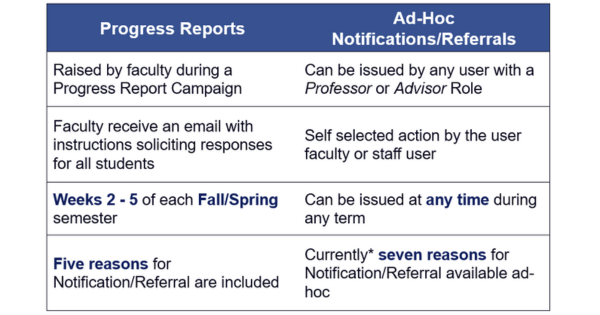
Faculty are encouraged to submit Academic Alerts (Progress Reports) via Navigate360 for students in their course(s) weeks 3, 4, and 5 of the semester. Reminders to submit alerts are sent on the first business day of weeks 3, 4, and 5.
Some alerts will trigger case creations for the CFAA and Dean of Students. Other alerts generate email reminders to students. See the email template below that Faculty receive to submit Academic Alerts.
(Please note: the Student Feedback link is individualized to the professor)
Academic Alert Email Request
Student Feedback Request
Subject: Help ETSU Support At-risk Students
Body:
Dear Professor [Name],
ACADEMIC ALERT Reporting is open through [date for end of week 5]
With your help, we can help more students succeed. Please use the link below to submit alerts for students you're concerned about in your classes this [term]. Be sure to write a comment for each student you refer.
When you submit an alert, the student will receive individualized outreach from student services staff such as Academic Advisors, Area Coordinators, Veteran's Services, TRIO, or the Jordan Center. For more information about Academic Alert response, please visit the Academic Alerts website.
If there are students who do not appear in your roster in the link below due to recent course changes, you can issue a Notification or Referral from your Professor Home Page.
Thank you!
Click to Begin Entering Student Feedback
The link above expires on [date for end of week 5]. If you would like to provide feedback after the expiration above, please contact your administrator.
How to Submit Academic Alerts
-
Progress Reports (Weeks 3, 4, & 5)
There are three ways to submit Academic Alerts (Progress Reports) during weeks 3, 4, and 5 of the semester:
- Follow the Click to Begin Entering Student Feedback link in your Student Feedback Request email or follow the Submit Academic Alerts from Email Campaign user-guide for visual instructions.
- Click Progress Reports beside your Courses from your Professor Home page in Navigate. See the Submit Progress Reports from Professor Home user-guide for visual instructions.
- When recording attendance in Navigate, Faculty can submit individual Progress Reports from the attendance screen. See the Submit Progress Reports from Attendance Taking user-guide for visual instructions.
-
Ad-hoc Notifications/Referrals (Outside Week 3, 4, & 5)
To submit an Academic Alert outside of weeks 3-5, issue a Notifcation or Referral. This ad-hoc process is completed from the Professor Home in Navigate under Actions. See the Issue Notification or Referral from Professor Profile user-guide for visual instructions.
Academic Alert Reasoning Outreach Process
-
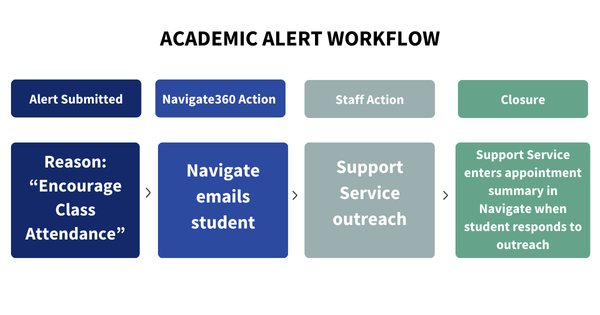
Class Attendance
Students: Are automatically notified by email that their Professor, {professor_name} is concerned they haven't been attending their {course_name}-{course_number} regurlarly. Contact information for the Dean of Students (DOS) Care Coordinators and Center for Academic Achievement (CFAA) is listed for additional support.
Staff: A student's Success Team (Athletics Advisor, TRIO Advisor, Veteran Advisor, etc.) contacts the student about their alert.
-
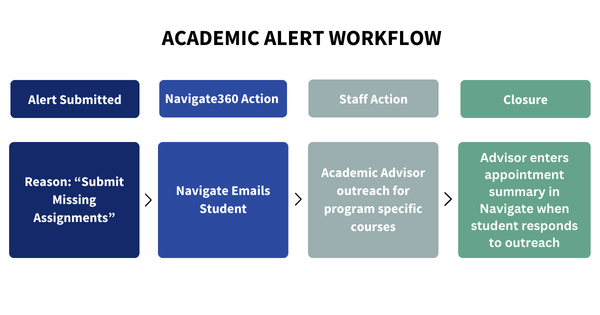
Missing Assignments
Students: Are automatically notified by email that their Professor, {professor_name} has noticed they haven't turned in some assignments in {course_name}-{course_number} and to contact their professor. Contact information for the Dean of Students (DOS) Care Coordinators and Center for Academic Achievement (CFAA) is listed for additional support.
Staff: Academic Advisors contact the student if the student is missing assignments in their primary program of study.
-
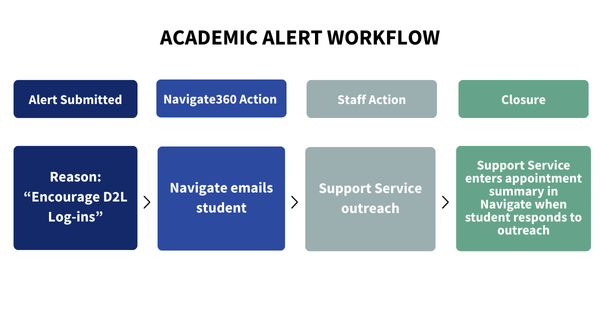
D2L Login
Students: Are automatically notified by email that their Professor, {professor_name} has noticed they haven't logged into D2L often enough in {course_name}-{course_number}. Contact information for the Dean of Students (DOS) Care Coordinators and Center for Academic Achievement (CFAA) is listed for additional support.
Staff: A student's Success Team (Athletics Advisor, TRIO Advisor, Veteran Advisor, etc.) contacts the student about their alert.
-
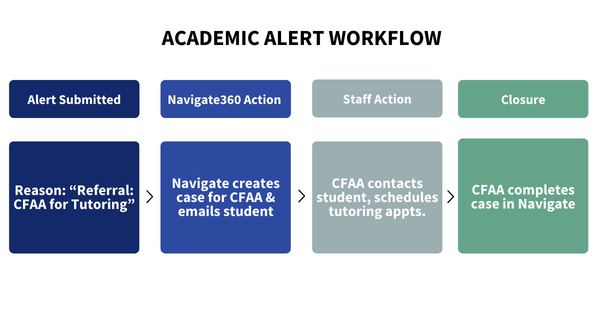
Referral: CFAA for Tutoring
Students: Are automatically notified by email they received an alert to visit the CFAA for tutoring.
Staff: A Referral: CFAA for Tutoring generates a Case in Navigate to the Center for Academic Achievement (CFAA). The CFAA emails the student a link to schedule either a Tutoring for a Course appointment, general writing help, or details about VIB Academic Coaching. If a student has not scheduled an appointment 5 days after initial outreach, the CFAA texts the student. In another 5 days, if the student still has not made an appointment, the CFAA calls the student. The Case is closed 3-5 days after the last contact attempt. Faculty are notified by email when the Case is closed.
See the CFAA Course Support List to find Tutoring and Supplemental Instruction (SI) help.
-
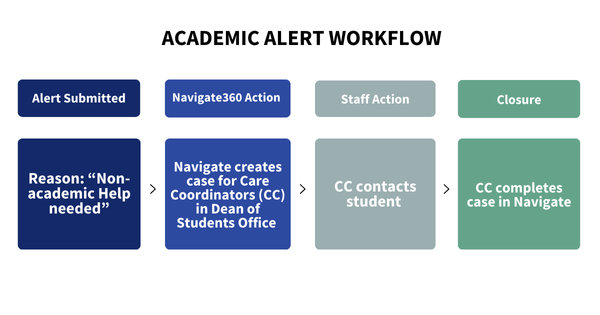
Referral: Non-Academic Help Needed
Staff: A Referral: Non-Academic Help Needed generates a Case in Navigate to the Dean of Students (DOS) office. The DOS Care Coordinators close the Case in Navigate, and emails the student. If the Care Coordinators receive no response from the student, they send a follow-up email 7 days from initial outreach. If no contact is made after the second attempt, the DOS Care Coordinators call the student. Faculty are notified by email when the Case is closed.
FAQs
-
What is the difference between Academic Alerts and Progress Reports?
Academic Alerts are Progress Reports!
-
Why are the courses I'm a co-instructor for not showing up in my Progress Reports campaign?
As Navigate360 is a shadow system of Banner, professors can only report on their courses in which they are listed as the Primary Instructor in Banner. If you are listed as a co-instructor for a course, only the listed Primary Instructor can submit alerts for the course through the campaign.
-
Can I submit an alert outside of the term's week 3-5 window?
Yes; the official Academic Alert campaign runs during weeks 3–5, but Faculty and Staff can submit alerts anytime during the semester if they are concerned about a student’s progress, attendance, or engagement.
-
What is the difference between Academic Alerts and CARE Reports?
Academic Alerts connect students with academic support, while CARE Reports connect them with resources for housing, mental health, and more to support their overall well-being.
-
What is the difference between Academic Alerts and ESPRs?
Academic Alerts identify students you're concerned about early in the term. Early Semester Progress Report (ESPRs) grades let students know how they're doing after midterms.